
Skip to content

The school office, finally in one system.

Admissions, attendance, examinations, marks and marksheets, organised around your academic session. Plus AI that writes your question papers and answers questions about your own school data.

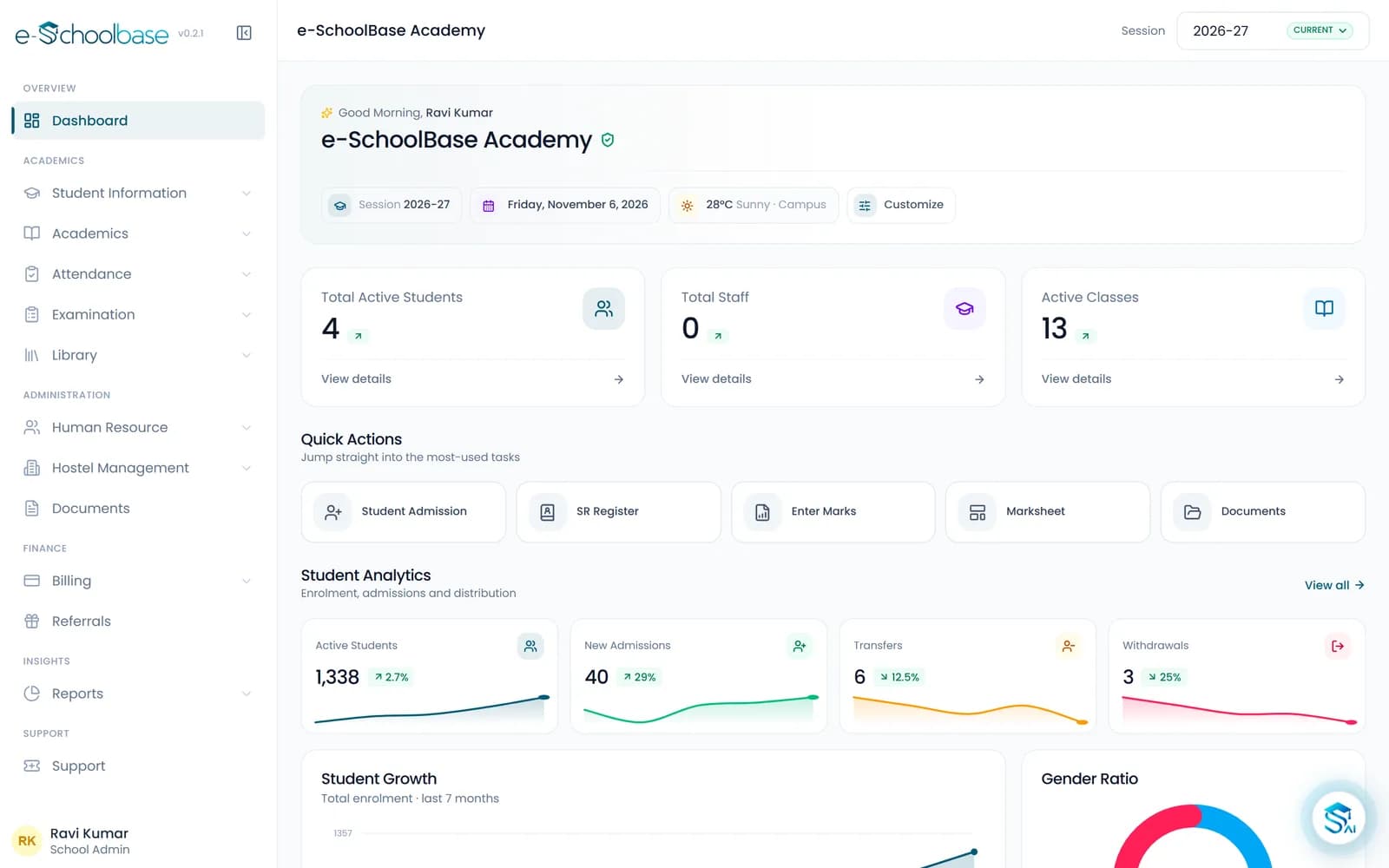
The e-Schoolbase dashboard with student, staff and class counts and quick actions
to import a full class list
3 minto import a full class list
to promote a whole session
1 passto promote a whole session
marksheets from marks entry
Automarksheets from marks entry
AI question papers
Built inAI question papers

A patchwork of registers, spreadsheets and disconnected tools.

Most schools do not lack software. They have too much of it, none of it connected, and the gaps get filled by staff doing the same work twice.

  • The same student, entered three times

    Admission register, attendance sheet, exam list: three records for one child, and none of them agreeing by November.

  • Exam season runs on paper

    Marks collected subject by subject on loose sheets, then typed into a marksheet template the night before results day.

  • Year-end takes a month

    Promotion lists made by hand, section by section, while next session’s admissions are already coming in.

Your academic year has a rhythm inside the software.

Everything is organised around the session. Set up at the start of the year, run terms and exams through it, and close it out by promoting students into the next one. Then the loop begins again.

  1. Step 1

    Set up

    April

    Classes, sections and subjects defined once. Students imported from a spreadsheet in minutes, roll numbers generated in bulk.

  2. Step 2

    Run

    Through the year

    Attendance marked daily. Terms and exams run on patterns you configured at the start of the year and reuse every term.

  3. Step 3

    Publish

    After every exam

    Marks entered in a focused grid. Marksheets and reports generated automatically, in your school’s own design.

  4. Step 4

    Promote

    March

    The whole session rolled into the next in a single guided pass, instead of a month of manual list-making.

Promotion sets up the next session, and the loop begins again.

The tedious parts, removed.

The work that makes staff resist new software is exactly the work this removes first.

  • Spreadsheet import

    Before
    Typing 800 students, one record at a time
    With e-Schoolbase
    Map your columns once, review, confirm
  • Roll numbers

    Before
    Numbered by hand, section by section
    With e-Schoolbase
    Generated in bulk for a whole class
  • Optional subjects

    Before
    Chased on paper, entered individually
    With e-Schoolbase
    Assigned from one screen for the class
  • Exam setup

    Before
    Rebuilt from scratch every term
    With e-Schoolbase
    Configured once, reused all year

AI that sets question papers and answers questions about your school.

Built for teaching work, not bolted on.

Question paper generator

Choose the subject, class and difficulty level. Get a balanced paper of multiple choice, short answers, long answers and case studies, then review, edit and export it. An evening of paper-setting becomes a few minutes.

  • Any subject and class
  • Difficulty level you choose
  • Editable before export

AI assistant, on every screen

Ask about student performance, attendance trends, admissions or exam results in plain language. Staff get answers without hunting through reports.

  • Which students in Class 9-B dropped below 60% attendance this term?
  • How did Class 10 perform in Mathematics compared to last session?
  • Which subjects in Class 10 still have marks entry outstanding?

Whoever opens it, it makes sense.

See the school without asking anyone to prepare a report.

Students, staff and classes counted live on the dashboard, every record one search away, and results downloadable for any class whenever you want to look.

  • Live counts of students, staff and classes
  • Quick actions for admissions, marks and marksheets
  • Result sheets and reports for any class, on demand

Start free. Move up when the school does.

Free covers the whole academic year: records, attendance, examinations and marksheets. Premium adds AI and the bulk operations that remove the repetitive work.

Free

Everything a school needs to run the academic year.

  • Students, admissions and staff records
  • Classes, sections and subjects
  • Attendance
  • Examinations, marks and marksheets
  • Standard report templates
  • Email support

Premium

Most schools choose this

Adds AI and the bulk operations that remove the repetitive work.

  • Everything in Free
  • AI question paper generation
  • AI assistant across every screen
  • Custom marksheet designs
  • Bulk import and bulk operations
  • Session promotion in a single guided pass
  • Priority support

Earn by recommending e-Schoolbase. Earn when a school you refer subscribes.

Compare the plans in full

How getting started works

  1. Book a demo

    Fill in the form. We call you to fix a time that suits you.

  2. Import your data

    Students, classes and staff come in from your spreadsheets. We help with the first import.

  3. Train your staff

    The office, teachers and the principal each learn the screens they will use.

  4. Go live

    Start with the modules you need now and add the rest when you are ready.

Before you switch.

Still unsure about something? Send us the question and we will answer it directly.

Spend less time on administration. More on students.

Start with one class and see how the session works end to end, from admissions to marksheets, before you commit to anything.